


Counter-Strike 2 Tips for Beginners: The Ultimate Starter Guide (No Experience Needed)

You just launched Counter-Strike 2 for the first time. You get shot before you even see an enemy. Your team types things you don't understand. You're not sure what to buy or where to go. Sound familiar? Don't worry - every great CS2 player started exactly where you are right now.
This guide gives you the best Counter-Strike 2 tips for beginners so you can go from totally lost to genuinely competitive. Whether you've never played a tactical shooter or you're just switching from another game, this CS2 beginner guide for 2026 has you covered.
What you'll learn in this guide:
The basics of how CS2 works (T vs CT, objectives)
10 essential CS2 tips for new players that actually make a difference
The best beginner settings for CS2 (sensitivity, crosshair, audio)
The 3 biggest mistakes new players make — and how to avoid them
How long it realistically takes to get good at CS2
Let's get into it.
📦 Quick Summary : CS2 Beginner Essentials
Crosshair placement is the single most impactful habit you can build
Stop moving before you shoot - accuracy drops to near-zero while running
Learn one map thoroughly before touching others
Use your economy wisely - saving is sometimes smarter than buying
Play with sound on - footsteps tell you where enemies are before you see them
This is a placeholder paragraph. Replace this text with your own content.
Table of Contents
What Is Counter-Strike 2? (A Quick Overview for New Players)
Counter-Strike 2 is a 5v5 tactical first-person shooter developed by Valve. It's one of the most popular competitive games in the world - and for good reason. Every match is a battle of skill, strategy, and communication.
One team plays as Terrorists (T-side) and the other as Counter-Terrorists (CT-side). The Terrorists try to plant a bomb at a designated bomb site (A or B) and defend it until it explodes. The Counter-Terrorists try to stop the plant - or defuse the bomb if it gets planted.
Matches are played in rounds. Win rounds, win the match. It's simple to understand but endlessly deep to master. CS2 is free to play on Steam, which makes it one of the most accessible competitive shooters available today.
10 Essential CS2 Tips for Beginners
This is the core of our CS2 beginner guide. Follow these tips and you'll immediately stand out from other new players.
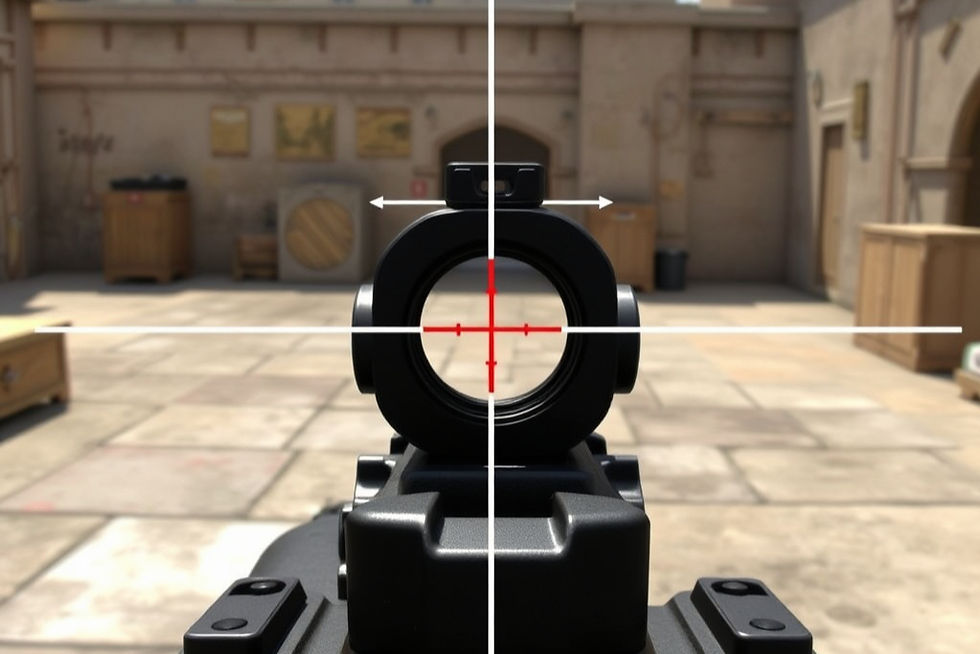
1. Always Priorities Crosshair Placement
Crosshair placement is the single most important habit in CS2. It means keeping your crosshair (your aim reticle) at head height at all times - so when an enemy appears, you barely have to move your mouse to get a kill. Using the right crosshair setup also helps, and choosing a clean dot style can improve precision, as explained in this guide on the ultimate dot crosshair for CS2 and CS.
Most new players aim at the floor while walking, then scramble to adjust when they spot an enemy. That scramble gets you killed. Instead, pre-aim at the spots where heads would appear around corners and doorways.
Do This: Walk through a map in a practice mode. Focus only on keeping your crosshair at head height at every turn. Don't worry about kills yet - just build the habit.
2. Stop Moving Before You Shoot
In CS2, accuracy and movement don't mix. If you're sprinting and spraying bullets, almost none of them will go where you want. Your spray pattern (the path bullets travel) becomes random when you're on the move.
The fix is simple: stop, then shoot. Or better yet, use short bursts of movement, stop briefly, fire one or two shots, and move again. This technique is called counter-strafing, and it's a core movement mechanic.
Do This: In your next match, make a rule before you fire, tap the opposite direction key to stop your momentum completely. It feels slow at first, but your hit rate will jump immediately.
3. Learn Recoil Control (Start With the AK-47 or M4)
Every gun in CS2 has a spray pattern a predictable path your bullets travel when you hold down the trigger. The AK-47 kicks up and to the right. The M4A4 is similar. Learning to pull your mouse in the opposite direction of the spray keeps your shots on target.
You don't need to master recoil control in your first week. Start by just firing in short bursts of 3–5 bullets instead of holding the trigger down. Burst firing is easier to control and still very effective. Learning recoil is just one part of aiming for a complete routine that builds precision, tracking, and flicking, see our full CS2 aim training guide.
Do This: Open a practice server, grab an AK-47, and shoot a full magazine at a wall. Watch the bullet holes to see the pattern. Then try to pull down and slightly left as you spray to counteract it.
🎯 Pro Tip: There are community-made CS2 recoil training maps on the Steam Workshop specifically designed to teach spray patterns. Search "recoil master" in the Workshop it's one of the best tools for improving aim.
4. Understand the Economy and Buy Phase
CS2 has an economy system you earn money for winning rounds, getting kills, and planting or defusing the bomb. At the start of each round, there's a buy phase where you spend that money on weapons and equipment.
The key rule: don't always spend everything you have. If your team just lost two rounds in a row, consider doing an "eco round" buy nothing or buy cheap so the whole team can afford rifles next round. Buying a pistol when your teammate has an AK doesn't help the team.
Do This: Before you buy, check what your teammates are buying. If most of them are eco-ing (saving), you should too. Coordination wins more rounds than individual gear.
💡 Pro Tip: The economy resets in overtime and follows different rules. But for now, the core habit is this: communicate before the buy phase to align your spending with your team.
5. Use Your Microphone and Communicate
CS2 is a team game, and communication is a genuine skill. Calling out enemy positions, warning teammates of pushes, and coordinating executes (planned attacks on a bomb site) makes your whole team stronger.
You don't need to be a pro caller. Even simple callouts like "A long, two enemies" or "He's low health, B site" are incredibly valuable. Most players appreciate any communication over silence.
Do This: Learn the callout names for one map (see tip 6). During your next match, try to make at least one verbal callout per round. That's it - one callout. Build from there.
6. Learn One Map Before Playing Others
CS2 has several competitive maps - Dust2, Mirage, Inferno, Anubis, and more. Don't try to learn them all at once. Instead, pick one map and get deeply familiar with it.
Dust2 is the most beginner-friendly choice. It's simple, open, and the callout names are well-known. Map awareness - knowing where enemies can come from, where to hold, and where to peek - is a massive advantage that only comes from repetition on a single map.
Do This: Queue only Dust2 for your first 20–30 hours of gameplay. Load it in practice mode and walk every corner. Know where A Long, B Tunnels, Mid Doors, and Catwalk are before you play a real match.
7. Use Sound — Footsteps Are Your Best Radar
CS2's sound design is intentional and tactical. Footsteps, reload sounds, and bomb beeps all give you real information. If you hear footsteps above you, that's an enemy. If you hear a reload, that's your window to push.
Walking (by holding Shift while moving) keeps you silent. Enemies won't hear you peeking or rotating. Meanwhile, if an enemy is running, you'll hear them coming and can prepare.
Do This: Play your next match with headphones on and sound fully up. Before entering any area, stop and listen for 2–3 seconds. You'll be shocked how much information sound gives you.
8. Peek Smart — Don't Wide-Peek Without Information
Peeking means stepping out from cover to check an angle or challenge an enemy. Wide-peeking - stepping completely out into the open without information - is one of the fastest ways to get killed as a beginner.
Instead, use tight peeks: step out just enough to see the angle, take your shot, and step back. You expose less of your body and control the engagement on your terms. Peeking safely is a skill that separates average players from good ones.
Do This: When you want to peek a corner, position your crosshair where the enemy's head would be, then take a tight step out. Don't jiggle in and out repeatedly - commit to one clean peek.
🎯 Pro Tip: "Jiggle peeking" (quickly peeking in and out) can be used to gather information without fully committing - but only attempt this once you're comfortable with basic peeking first.
9. Don't Rush — Patience Wins Rounds
CS2 beginners almost always rush. They run into a bomb site immediately, die, and spend most of the round as a spectator. Patience is a genuine weapon in CS2.
Hold angles. Let enemies come to you. The Terrorists have to plant the bomb and often push aggressively. As a CT, you often win simply by holding a strong position and waiting. Even as a T, communicating before rushing a site instead of going solo always gives better results.
Do This: At the start of a round, take a breath. Don't move until you have a plan or your team starts moving. Simply waiting 10 extra seconds and letting enemies show themselves will get you more kills than rushing ever will.
10. Warm Up Before Every Session With Aim Training
You wouldn't sprint a marathon without stretching first. CS2 is the same - your aim needs to warm up. Jumping straight into ranked matches cold means your first few rounds will suffer.
Spend 10–15 minutes before every session doing aim training. CS2 has built-in modes for this, but dedicated tools like Aim Lab (free on Steam) are even better for drilling specific mechanics like tracking, flicking, and precision.
Do This: Before your next session, open Aim Lab and run one 10-minute drill on precision clicking. Then load into a CS2 deathmatch server for 5 minutes. After that, you're warmed up and ready to play your best.
Best CS2 Settings for Beginners (Quick Setup Guide)
Getting your settings right removes friction and lets you focus on learning. Here's a simple beginner-friendly setup:

Setting | Recommended Value | Why |
Mouse Sensitivity | 400 DPI / 1.5–2.0 in-game | Low sens = more control and precision |
eDPI | 600–800 total | Sweet spot for new players |
Raw Input | On | Ignores Windows mouse acceleration |
Resolution | 1280x960 (stretched) or 1920x1080 | Lower res = easier to spot enemies |
Crosshair Style | Static, small dot or classic small | Cleaner than dynamic crosshair |
Crosshair Colour | Cyan or green | High contrast against most backgrounds |
Volume | 80–100% | You need to hear footsteps clearly |
Music | Off | Eliminates distractions |
Radar Scale | 0.5–0.7 | Shows more of the map at once |
Quick note on sensitivity: Lower is almost always better in CS2. A low DPI + low in-game sens gives you precise, controlled aim. If your sens feels too slow at first, resist the urge to crank it up your muscle memory just needs time to adjust. If you want a deeper dive into advanced configs, pro setups, and optimization tips, check out our full CS2 settings guide for all skill levels.
The 3 Biggest Mistakes CS2 Beginners Make (And How to Avoid Them)
Even talented new players fall into these traps. Knowing them puts you ahead of most beginners before you've played a single ranked match.
Mistake1: Panic Spraying
You spot an enemy. You panic. You hold down the trigger and spray wildly, hitting nothing. This is the most common beginner mistake in CS2 and it gets you killed almost every time.
Instead, tap or burst-fire at range and spray only at very close distances. At long range, 1–2 well-aimed shots beat 30 panicked ones every single time. Trust the process, slow down your trigger finger, and aim before you shoot.
Mistake 2: Playing Alone and Not Communicating
CS2 is not a solo game. Players who run off alone, ignore their team, and never use their microphone consistently lose even when they're skilled. You become unpredictable to your teammates and an easy solo target for enemies.
Use voice chat. Make callouts. Tell your team when you're rotating (changing position). Coordinate before rushing a bomb site. You'll win more rounds in one communicative match than in five silent ones.
Mistake 3: Ignoring the Economy
Buying whatever you want every round without thinking about your team's money is one of the subtlest ways to lose matches. If your team is saving (eco round) and you spend $5,000 on a full kit, you've split your team's firepower for zero tactical benefit.
Check your team's economy before buying. A unified team that full-buys together or saves together is dramatically stronger than five players with random gear. Even in low-rank matches, economy discipline wins rounds.
How Long Does It Take to Get Good at CS2?
This is one of the most common questions new players have and the honest answer is: it varies, but faster than you think if you're intentional about it.
Most players see real improvement within 50–100 hours of play, especially if they're actively practicing crosshair placement and map awareness rather than just playing casually. Using aim training tools like Aim Lab for 15 minutes a day accelerates progress significantly.
Watching one YouTube tutorial or pro match VOD per week adds another layer of learning without grinding hours. The key is consistent, focused play not just logging hours mindlessly. CS2 rewards deliberate practice more than any other shooter. If you prefer a more casual learning curve before committing to CS2, you might enjoy trying some of the best free FPS games for beginners.
Conclusion
CS2 has a real learning curve but it's one of the most rewarding games you'll ever get good at. Here are the three takeaways to carry with you:
Keep your crosshair at head height - always, everywhere, every round.
Learn one map first - depth beats breadth when you're starting out.
Communicate with your team - one callout per round is all it takes to start.
Bookmark this guide and come back to it as you progress. Share it with a friend who's also just starting out everything's more fun with a teammate who knows what they're doing.
Drop your biggest CS2 question in the comments below! We read every one and will help you out.
"The gap between a beginner and a good CS2 player isn't talent - it's crosshair placement, patience, and 100 hours of deliberate practice." — The Gaming Diary
FAQ
Is CS2 good for beginners?
Yes, CS2 is a great game for beginners especially now that it's free to play. The game has an in-built matchmaking system that pairs you with players at your skill level, so you won't be thrown in against pros straight away. The learning curve is steep but incredibly rewarding once it clicks.
What is the best sensitivity for CS2 beginners?
A good starting point for CS2 beginners is 400 DPI with an in-game sensitivity of 1.5 to 2.0, giving you an eDPI between 600 and 800. Low sensitivity gives you more precise control over your aim, which is especially important for beginners still building muscle memory. Avoid the temptation to raise it too quickly lower is almost always better in CS2.
How do I improve my aim in CS2?
The fastest way to improve your aim in CS2 is to combine in-game deathmatch practice with a dedicated aim trainer like Aim Lab (free on Steam). Focus on crosshair placement first getting your aim to head height before enemies appear. Then work on recoil control by practising the AK-47 and M4 spray patterns on a wall in a practice server.
What maps should CS2 beginners play first?
Dust2 is the best starting map for CS2 beginners. It has a straightforward layout, widely recognised callout names, and almost everyone knows how to play it. Once you're comfortable on Dust2, Mirage is an excellent second map to learn. Resist the urge to learn multiple maps at once depth beats breadth at the beginner stage.
Is CS2 free to play?
Yes, Counter-Strike 2 is completely free to play on Steam. You can download it on PC via the Steam store page (opens in new tab) and jump straight into matchmaking with no purchase required. There are cosmetic items (skins) available for purchase, but these have zero impact on gameplay you'll never be at a disadvantage for playing free.


Comments